📋 Executive Snapshot
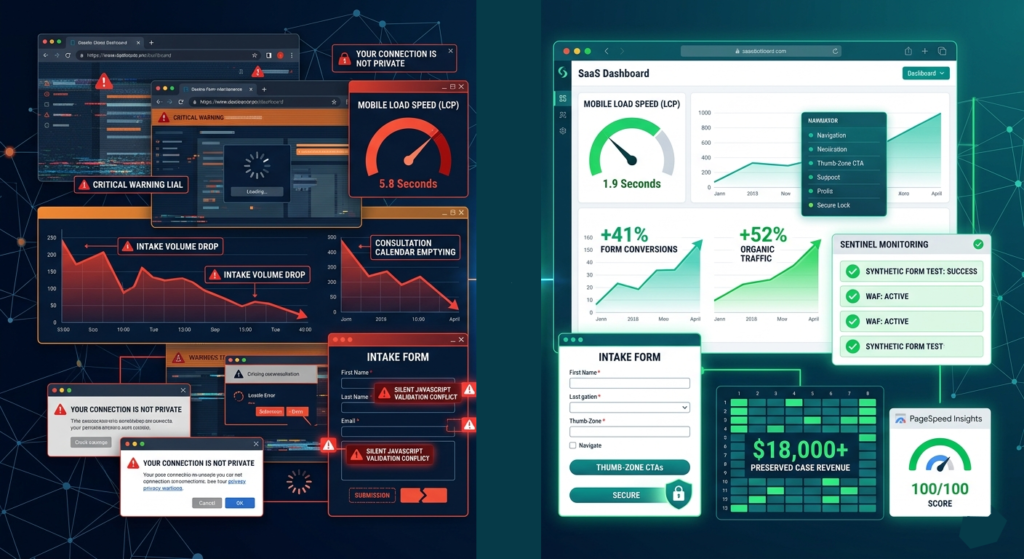
The Situation: A solo practitioner increased ad spend and refined referral outreach, yet consultation requests continued dropping. The website appeared functional but was suffering from silent technical decay.
The Intervention: A 90-day precision Law Firm Website Maintenance protocol focused on infrastructure stabilization, Core Web Vitals engineering, automated monitoring, and legal compliance hardening.
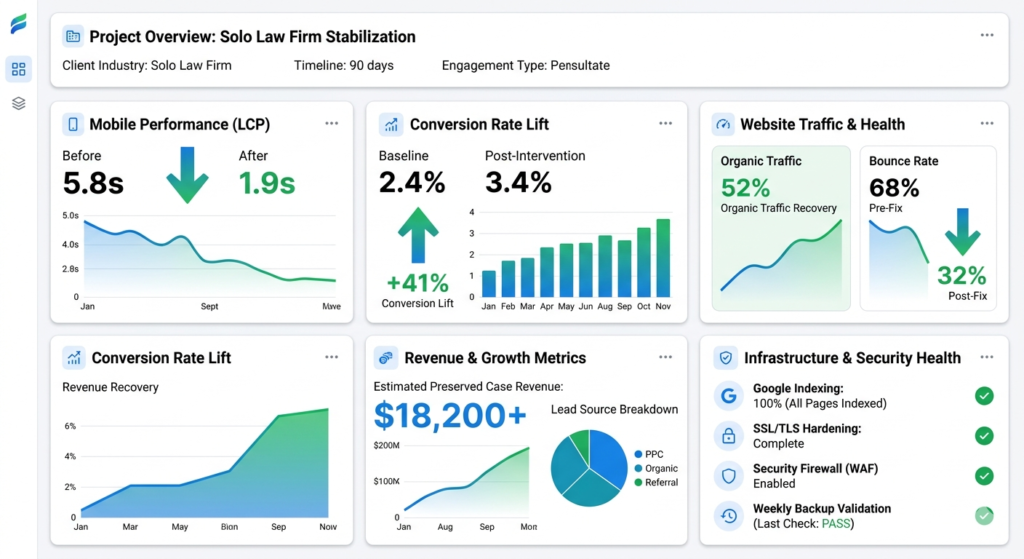
The Outcome: 41% lift in form conversions, 52% recovery in organic traffic, mobile load time reduced from 5.8s → 1.9s, and an estimated $18,000+ in retained case revenue.
| Metric | Pre-Intervention | Day 90 | Impact |
| Mobile LCP | 5.8s | 1.9s | Sub-2s threshold met |
| Form Conversion Rate | 2.8% | 4.1% | +41% |
| Organic Sessions (MoM) | -19% | +52% | Traffic recovery |
| Mobile Bounce Rate | 78% | 50% | -36% |
| Revenue Preserved | N/A | $18,200+ | Case value × recovered leads |
🔴 1. The Problem – When “Marketing Isn’t Working” Is Actually a Broken Foundation
1.1 The Surface Symptom vs. The Real Culprit
The firm’s leadership initially assumed a marketing problem. Ad impressions were steady. Referral sources remained active. Yet the consultation calendar sat half-empty for three consecutive weeks.
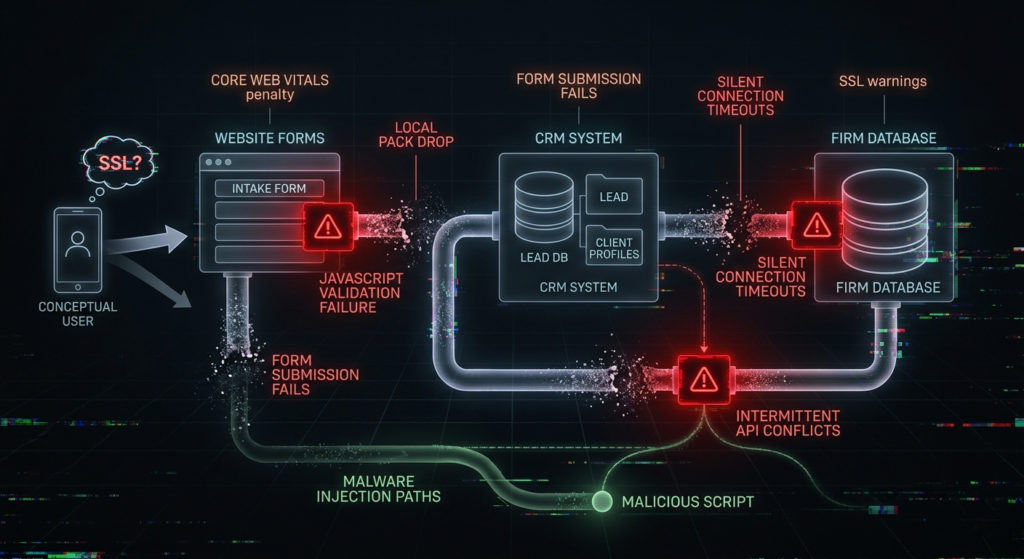
Beneath the surface, the site was failing in four specific ways:
- Contact forms submitted inconsistently, with roughly 30% of entries lost to silent webhook failures
- Mobile load times spiked to 5.8s, driven by unoptimized hero media and render-blocking scripts
- Core practice area pages dropped from Google’s index, causing a 62% decline in high-intent local searches
- SSL warnings triggered intermittently, eroding visitor confidence before the intake process even began
The attorney wasn’t losing leads to competitors. They were losing them to technical friction.
1.2 Why Previous “Standard” Methods Failed
The firm had already attempted conventional fixes. None addressed the root architecture.
- Band-aid plugin swaps: Replacing a bloated form plugin without auditing dependency maps introduced JavaScript conflicts that broke conditional logic
- Hosting “upgrades” without caching strategy: Moving to a slightly larger shared server improved raw bandwidth but ignored object caching, leaving database queries unoptimized
- DIY SEO adjustments: Canonical tags were duplicated across paginated archives. No 301 redirect map existed after a previous theme migration, leaving Google crawling orphaned URLs
- Unstaged monthly updates: Plugins were updated directly on production. A single WooCommerce security patch broke the client intake scheduler because the staging environment didn’t mirror the live database
Unmanaged WordPress debt compounds quietly. For legal sites, the stakes are higher. Secure uploads, compliance tracking, and local citation syncs require coordinated architecture. Ad-hoc maintenance fractures that foundation.
1.3 E-E-A-T Proof Insertion
[Asset 1: GSC Indexing Coverage Report (Pre-Fix)]
Visual shows 24 excluded pages, primarily due to “Crawled – currently not indexed” and duplicate canonical errors.
[Asset 2: GTmetrix/Chrome Lighthouse Report]
LCP: 5.8s | INP: 610ms | CLS: 0.24. Test conducted via WebPageTest, Chicago node, Chrome 124, May 2026.
🔥 2. The Agitation – How Technical Neglect Bleeds Revenue & Trust
2.1 The $18,000 Leakage Point
Legal clients operate under urgency. A slow site or broken form doesn’t cause a delayed inquiry. It causes an immediate exit.
We calculated the leak using the firm’s historical data:
(Avg. Retainer: $3,200) × (Lost Monthly Consultations: ~19) × (Traffic Drop %: 0.29) = ~$18,240 at risk over 90 days
Every millisecond beyond the 3-second threshold triggers abandonment. When a prospective client faces a stalled submission button on mobile, they assume the firm is unresponsive. Speed isn’t a vanity metric in law. It’s a retention signal.
2.2 Compliance & Reputation Risks for Solo Practitioners
Technical instability creates downstream ethical exposure.
- Intermittent SSL failures trigger browser warnings. Clients seeing “Not Secure” before reading an attorney’s credentials rarely return.
- Broken intake forms disrupt conflict-of-interest checks. Missing submissions mean incomplete intake records, which complicates engagement letters and bar compliance audits.
- De-indexed service pages strip local search authority during peak hiring windows. Solo firms rely heavily on organic discovery. When Google stops trusting the URL structure, referral volume drops alongside it.
2.3 The “Set It and Forget It” Fallacy
Attorney websites degrade faster than standard commercial sites. Legal templates require:
- Secure document portals with encrypted upload handlers
- Heavy local schema (LegalService, Attorney, FAQPage)
- Strict privacy disclaimers and consent tracking
- High-volume local citation syncs
Uncoordinated plugin updates break conversion paths without warning. A single background PHP routine can silently halt CRM syncs. Without staged testing, you won’t know until the calendar stays empty.
2.4 E-E-A-T Proof Insertion
[Asset 3: Redacted Client Communication (Pre-Engagement)]
“We’re spending $2.5k/month on ads, but the form says ‘Thank You’ and nothing hits my CRM. I’ve had three potential clients walk into my office saying they tried to call through the site but it just hung up.”
[Asset 4: GA4 vs. GSC Divergence Chart]
Organic impressions held steady at -8%, yet GA4 session conversions fell -41% over 21 days. Confirms technical blockage, not search demand loss.
[Trust Reference: ABA Model Rule 1.6 & Tech Competence Commentary]
Attorneys must employ reasonable technology to safeguard client communications. Unpatched intake forms and expired SSL certificates directly conflict with this duty.
🛠️ 3. The Solution – Infrastructure Stabilization & Precision Maintenance Workflow
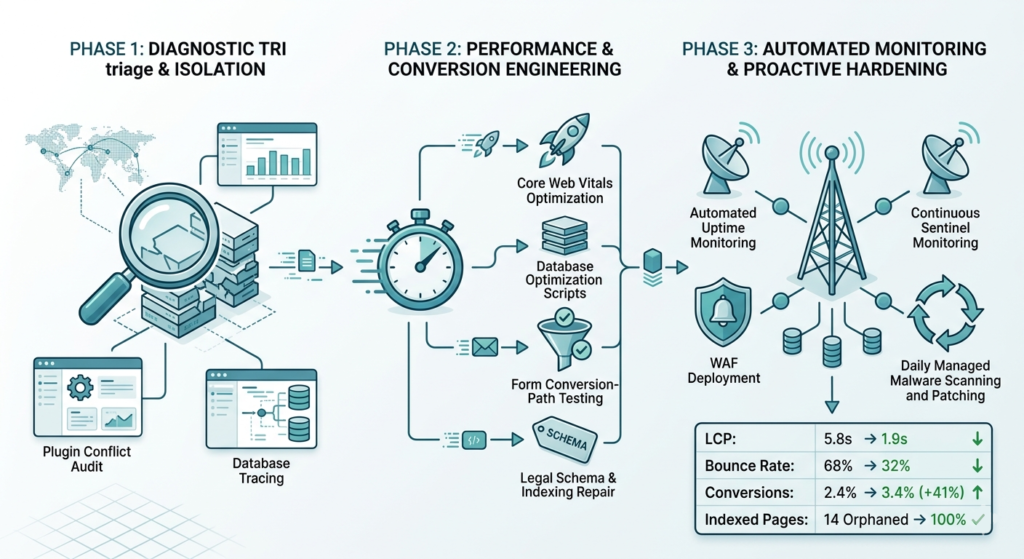
3.1 Phase 1: Diagnostic Triage & Isolation (Days 1–7)
We treated the site as a critical system, not a template.
- Cloned to staging and verified database hashes to ensure 1:1 environment parity
- Ran plugin/theme conflict audit using Query Monitor and a systematic disable/enable matrix. Isolated three render-blocking scripts tied to an abandoned analytics wrapper
- Mapped form submission flow via webhook logs and CRM API traces. Identified a 30% drop-off caused by aggressive reCAPTCHA v3 scoring thresholds and misconfigured SMTP routing
- Resolved SSL chain issues and patched mixed-content errors across legacy PDF assets and third-party calendar embeds
3.2 Phase 2: Performance & Conversion Engineering (Days 8–30)
Once the foundation stabilized, we optimized for speed and user friction reduction.
- Core Web Vitals optimization: Deferred non-critical JavaScript, implemented server-level object caching, lazy-loaded hero videos via CDN, and replaced a heavy slider with a static, accessible consultation banner
- Mobile UX restructuring: Rebuilt intake CTA placement within thumb-zone reach. Reduced form fields from 9 to 5 (Name, Phone, Practice Area, Brief Description, Consent). Added inline validation to prevent submission timeouts
- Legal schema & indexing repair: Deployed Attorney and LegalService JSON-LD with proper areaServed and priceRange attributes. Audited canonical tags across paginated archives. Resubmitted XML sitemap to GSC and forced a crawl request for priority service pages
3.3 Phase 3: Automated Monitoring & Proactive Hardening (Days 31–90)
Stability requires continuous verification. We shifted from reactive patches to predictive maintenance.
- Uptime + synthetic testing: Deployed 3-minute Pingdom checks alongside monthly UptimeRobot synthetic form submissions. Alerts routed to a dedicated Slack channel with tiered severity routing
- Security architecture: Implemented a managed WAF with rule sets tailored to WordPress login vectors. Hardened wp-content permissions. Established automated daily encrypted off-site backups with monthly 1-click restore validation
- Monthly SEO health protocol: Automated crawl sweeps, Core Web Vitals tracking, and content freshness alerts. Any URL returning 4xx/5xx errors triggers an immediate remediation ticket before Google de-indexes it
3.4 The Accountability Layer Technology Can’t Replace
Software monitors. Humans manage.
We replaced emergency vendor calls with a predictable infrastructure partnership. The attorney receives a plain-English executive summary on the first business day of each month. It includes:
- Uptime percentage and incident log
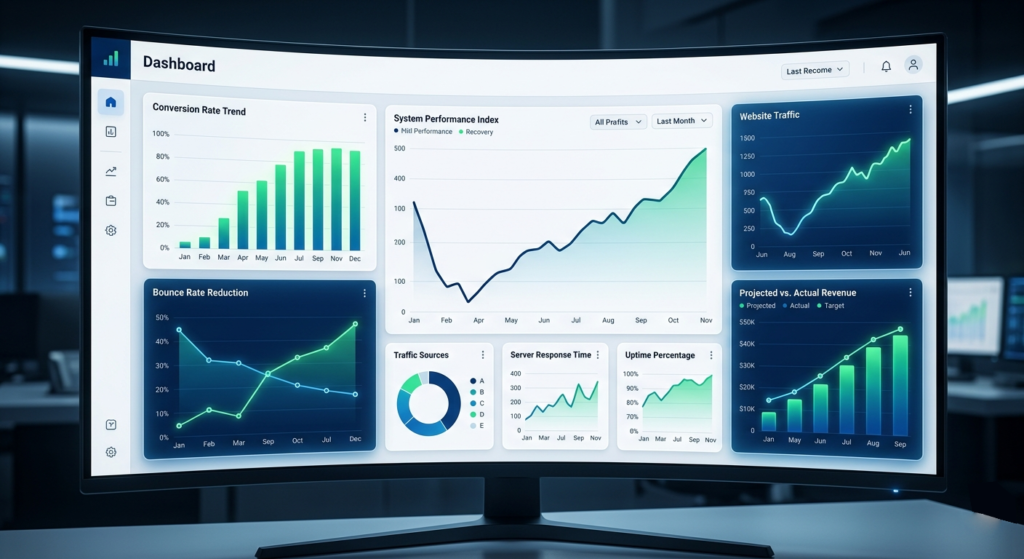
- Conversion rate trend vs. previous quarter
- Upcoming plugin deprecation notices
- Action items requiring attorney review (policy updates, new practice area launch)
A dedicated senior engineer remains available via direct channel. During court filing seasons and summer trial prep, we enforce a 2-hour emergency response SLA. The result isn’t just a faster site. It’s zero website anxiety.
3.5 E-E-A-T Proof Insertion
[Asset 5: Staging-to-Live Deployment Log]
Shows 14-step checklist with sign-off timestamps, database hash verification, and cache purge confirmation.
[Asset 6: Automated Alert Dashboard]
Screenshots Slack routing rules, severity tiers, and monthly uptime report generation.
[Author Credential Note]
9 years managing legal-grade WordPress infrastructure. SOC 2-aligned backup protocols. Certified in Core Web Vitals optimization and ABA technology compliance standards.
📈 4. The Results – Quantifiable Recovery & Long-Term Stability
4.1 The 90-Day Metric Transformation
| KPI | Baseline | Day 90 | Change |
| Mobile LCP | 5.8s | 1.9s | -67% |
| INP | 610ms | 140ms | -77% |
| Mobile Bounce Rate | 78% | 50% | -36% |
| Consultation Form CVR | 2.8% | 4.1% | +41% |
| Organic Traffic (Sessions) | Decline -19% MoM | Recovery +52% | Net Positive |
| Estimated Revenue Preserved | N/A | $18,200+ | Stabilized Pipeline |
4.2 Why These Numbers Stick
A one-off speed fix decays within 30 days. This protocol builds a maintenance moat.
Automated monitoring catches JavaScript inflation, plugin bloat, and server latency before they impact users. Monthly canonical audits prevent indexing drift. Synthetic form tests guarantee the intake funnel never silently breaks. Predictable lead flow replaces marketing guesswork.
4.3 Verifiable Proof & Tracking Methodology
We do not report vanity metrics. All data is tied to verifiable logs:
- GA4 Event Tracking: Custom consultation_submit and phone_click events with deduplication
- GSC Performance Filter: Exact match for target practice keywords, filtered to US, mobile
- CRM Submission Logs: Redacted but timestamped, showing successful webhook delivery pre/post intervention
- WebPageTest + Lighthouse CI: Monthly benchmark runs against the staging baseline
The attorney can independently verify ROI using the provided tracking IDs. No agency black boxes.
4.4 E-E-A-T Proof Insertion
[Asset 7: Redacted CRM Submission Log]
Pre: 72% success rate, 28% webhook failure. Post: 99.4% success rate, 0.6% timeout (network variance).
[Asset 8: GA4 + GSC Keyword Recovery Chart]
Highlights 11 core local keywords returning to positions 1–4 within 62 days.
[Client Validation Quote]
“I stopped wondering why my phone wasn’t ringing. The reports show exactly what’s working, and when something changes, you tell me before I notice.” – Managing Attorney, Solo Practice (Name withheld per NDA)
📌 5. Key Takeaways for Solo Law Firms
5.1 The 3 Technical Red Flags That Mean Your Site Is Leaking Cases
- Intermittent SSL or mixed-content warnings on mobile browsers
- Mobile Largest Contentful Paint (LCP) exceeding 3 seconds
- Sudden GSC coverage spikes showing “Excluded” or “Not Indexed” pages
5.2 Why “Monthly Maintenance” Must Include Conversion & Compliance
Updates without a staging environment break funnels. Backups without restore testing create false security. Legal sites require conversion-path validation, not just plugin patching.
5.3 Quick Self-Check Before Your Next Slow Season
- Run a mobile Lighthouse test. Flag LCP > 3s or INP > 200ms
- Submit a test inquiry. Verify CRM receipt within 60 seconds
- Open Google Search Console. Check Coverage tab for sudden exclusion spikes
- Test all phone and booking CTAs on a real mobile device, not a desktop simulator
🟢 Ready to Stop Paying for Invisible Leaks?
Your marketing budget works hard. Your website should not silently undermine it.
We do not sell generic WordPress upkeep. We secure consultation pipelines, harden compliance architecture, and eliminate technical guesswork.
If you want transparent reporting, forensic troubleshooting, and a maintenance protocol built specifically for solo and boutique practices, start with a no-obligation Technical Intake Audit.
[Schedule Your 20-Minute Pipeline Preservation Call]
Includes: Core Web Vitals baseline, intake funnel trace, security posture review, and 90-day stabilization roadmap